 : +86-139 0587 7291
 انگریزی
 Español
 روسی
روسی Français
 العربية
 پرتگالی برازیل کرتے ہیں۔
 Українська
 Türkçe
 پولسکی
 نیدرلینڈز
 اطالوی
 بہاسا انڈونیشیا
 ہندی
ہندی اردو
اردو አማርኛ
አማርኛ Հայերեն
 ไทย
ไทย منگول
منگول فارسی
فارسی شکپ
شکپ Ελληνικά

مکینیکل ٹائمر سوئچ: اقسام، کیسے استعمال کریں اور مزید
Table of Contents
ٹوگل کریں۔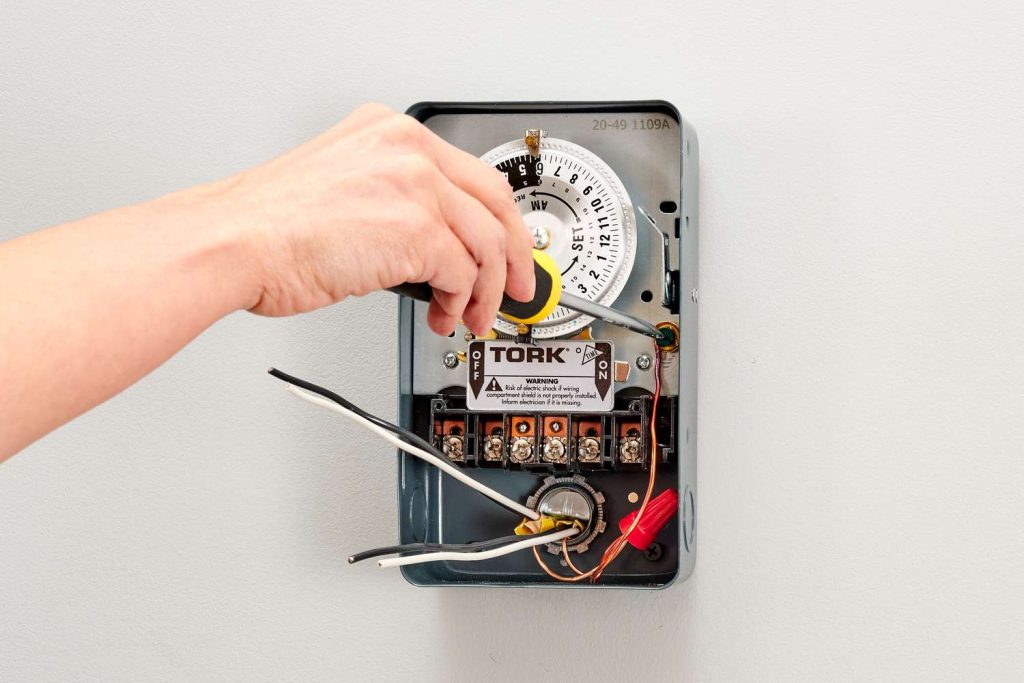
A mechanical timer switch, also referred to as an analog ٹائمر سوئچ، ایک ٹائمنگ ڈیوائس ہے جو بجلی کے آلے کو بجلی کی فراہمی کو منظم کرنے کے لیے اسپرنگس، گیئرز، اور الیکٹرک موٹرز جیسے جسمانی اجزاء کا استعمال کرتی ہے۔
اس ڈیوائس کے بارے میں مزید جاننے کے لیے، شروع کرنے کے لیے یہاں ایک عملی گائیڈ ہے۔
مکینیکل ٹائمر سوئچ کیسے کام کرتا ہے؟
ینالاگ طریقے سے کام کرتے ہوئے، یہ گھڑی کے کام کے میکانزم کا استعمال کرتا ہے اس بات کا تعین کرنے کے لیے کہ پاور کو کب آن اور آف کرنا ہے۔
اس قسم کے ٹائمر سوئچ کو دستی طور پر ایک نوب کو ایڈجسٹ کر کے پاور آن یا آف کرنے کے لیے مطلوبہ وقت کا وقفہ مقرر کر کے کنفیگر کیا جاتا ہے۔
اگرچہ مکینیکل ٹائمر سوئچ لاگت سے موثر اور ترتیب دینے کے لیے سیدھے ہوتے ہیں، لیکن وہ بڑے ہو سکتے ہیں اور حرکت پذیر حصوں کے استعمال کی وجہ سے زیادہ دیکھ بھال کی ضرورت ہوتی ہے۔
عام طور پر روشنی، آلات، اور دیگر برقی آلات کے انتظام کے لیے کام کیا جاتا ہے، وہ مختلف نظاموں کو خودکار کرنے کا ایک اقتصادی ذریعہ پیش کرتے ہیں۔
زیادہ پیچیدہ ڈیجیٹل اور الیکٹرانک ٹائمرز کے ابھرنے کے باوجود، مکینیکل ٹائمر سوئچز روشنیوں اور دیگر آلات کی نگرانی کے لیے ایک سادہ اور بجٹ کے موافق آپشن بنے ہوئے ہیں۔
مکینیکل ٹائمرز کی اقسام
Mechanical timer switches can be categorized by several factors. Understanding these types helps you choose the right model for your specific application.
By Time Cycle
- 24-Hour Mechanical Timer: The dial completes one full rotation every 24 hours. Best suited for daily routines that repeat the same pattern every day, such as turning porch lights on at dusk and off at dawn. Each pin typically represents a 15-minute block, giving you up to 96 ON/OFF segments per day.
- 7-Day Mechanical Timer: The dial completes one rotation every 7 days, allowing different schedules for weekdays and weekends. Ideal for commercial settings where operating hours vary — for example, a shop sign that needs to stay on later on Fridays and Saturdays.
By Installation Method
- Plug-In Timer: Plugs directly into a standard wall outlet. The appliance then plugs into the timer. No wiring required — ideal for residential use with lamps, fans, aquarium equipment, and small pumps.
- DIN Rail Mounted Timer: Installed inside an electrical panel on a standard DIN rail. Requires a hardwired connection by a qualified electrician. Used in commercial and industrial settings for controlling lighting circuits, irrigation systems, HVAC equipment, and motor-driven machinery.
By Number of Channels
- Single-Channel Timer: Controls one electrical circuit. Sufficient for most residential applications.
- Multi-Channel Timer: Controls two or more independent circuits from a single unit, each with its own ON/OFF schedule. Useful in commercial buildings where multiple systems (e.g., interior lights, exterior signs, ventilation) need independent timing.
By Contact Capacity
- Mechanical timers are rated by the maximum current they can safely switch. Residential plug-in models typically handle 10A–16A, suitable for lighting and small appliances. Industrial DIN rail models — like the TOSUNlux THC-15A — support up to 30A, capable of controlling heavier loads such as pumps, motors, and heating elements.
- When selecting a mechanical timer switch, match the timer’s rated amperage to your load. Connecting a device that draws more current than the timer’s rating will cause overheating and potential failure.
جہاں مکینیکل ٹائمر سوئچ استعمال کیے جاتے ہیں۔
مکینیکل ٹائمر سوئچز ورسٹائل ڈیوائسز ہیں جو مختلف مقاصد کے لیے استعمال ہوتے ہیں۔ یہاں ان کے استعمال اور فوائد کی ایک خرابی ہے:
- لائٹنگ کنٹرول: انڈور اور آؤٹ ڈور لائٹنگ سسٹم کو خودکار کرنے کے لیے مثالی۔
- آلات کا انتظام: اوون اور واٹر پمپ جیسے آلات کے انتظام کے لیے مفید ہے۔
- HVAC کنٹرولز: حرارتی اور کولنگ سسٹم کو موثر طریقے سے ریگولیٹ کرنے میں مدد کرتا ہے۔
- لاگت سے موثر: گھر اور صنعتی نظام کو خودکار کرنے کے لیے ایک سستی حل فراہم کرتا ہے۔
- صارف دوست: اپنی سادگی اور استعمال میں آسانی کے لیے جانا جاتا ہے، انہیں ہر کسی کے لیے قابل رسائی بناتا ہے۔
- پائیدار: آخری تک بنایا گیا، مختلف ترتیبات میں وشوسنییتا پیش کرتا ہے۔
- صنعتی اور گھریلو استعمال: رہائشی اور صنعتی ایپلی کیشنز دونوں کے لیے موزوں ہے۔
کی موجودگی کے باوجود ڈیجیٹل ٹائمر سوئچ, مکینیکل ٹائمر سوئچز اپنی استطاعت اور سیدھے سادے آپریشن کی وجہ سے مقبول انتخاب بنے ہوئے ہیں۔
مکینیکل ٹائمر سوئچز کا استعمال کیسے کریں۔
ٹائمر یا اینالاگ سوئچ کو لاگو کرنے کے لیے، آپ کو ایک موجودہ سسٹم کی ضرورت ہے، چاہے وہ صنعتی ہو یا ذاتی پیمانے پر۔
ذاتی نظام کی مثالوں میں ایکویریم موٹرز، فلٹرز اور لائٹس کو ریگولیٹ کرنا شامل ہے۔
جب کہ ڈیجیٹل ماڈل عین مطابق ایڈجسٹمنٹ کی اجازت دیتے ہیں، لیکن مکینیکل اینالاگ ٹائم گھڑیاں صارف دوست ہیں، جو سرکلر ڈھانچے پر نشانات کے ساتھ آغاز اور اختتامی پوائنٹس کی نشاندہی کرتی ہیں۔
مکینیکل سوئچز میں + یا – 5 منٹ کا انحراف ہوسکتا ہے۔
ڈیجیٹل ماڈلز کے لیے، ہفتہ وار، روزانہ، اور فی گھنٹہ کے منصوبے درست منٹ کی ترتیبات کے ساتھ ممکن ہیں، جو تفصیلی کنٹرول فراہم کرتے ہیں۔
مناسب ٹائمر کی قسم اور ماڈل کا انتخاب کرنا — ڈیجیٹل یا اینالاگ — ہاتھ میں کام کے مقصد اور مخصوص ضروریات پر منحصر ہے۔
مکینیکل ٹائمر سوئچ کیسے سیٹ کریں۔
مکینیکل ٹائمر سوئچ کو ترتیب دینے کے لیے، ان عمومی اقدامات پر عمل کریں:
- ٹائمر کو دیوار سے اور آلات کو ٹائمر سے جوڑیں۔
- موجودہ وقت سیٹ کرنے کے لیے ڈائل کو ایڈجسٹ کریں۔
- Press down the pins for the times you want the device to activate, and keep them pulled out for when you want the device to deactivate.
- اگر دستیاب ہو تو، ٹائمر کو "آن-آٹو-آف" موڈ پر سیٹ کریں۔
- دستی سوئچ بٹن کو "ٹائمر" کی ترتیب میں تبدیل کریں۔
مکینیکل ٹائمر سوئچ کے مخصوص ماڈل کی بنیاد پر یہ اقدامات قدرے مختلف ہو سکتے ہیں۔
اہم: درست رہنمائی کے لیے ہمیشہ مینوفیکچرر کی ہدایات سے مشورہ کریں۔
مکینیکل ٹائمر سوئچ کو کیسے ٹھیک کریں جو کام نہیں کر رہا ہے۔
خرابی والے مکینیکل ٹائمر سوئچ کے مسائل کو حل کرنے کے لیے، تلاش کے نتائج سے اخذ کردہ ان عمومی ٹربل شوٹنگ اقدامات پر غور کریں:
- مرحلہ 1: ٹائمر کی ترتیبات کی تصدیق کریں۔: تصدیق کریں کہ ٹائمر درست طریقے سے سیٹ کیا گیا ہے، کیونکہ غلط سیٹنگز غیر متوقع خرابی کا باعث بن سکتی ہیں۔
- مرحلہ 2: ٹائمر کی وائرنگ چیک کریں۔: مناسب وائرنگ اور بجلی کی تقسیم کو یقینی بنائیں، ڈھیلے ٹرمینلز سے خطاب کرتے ہوئے جو بجلی کے بہاؤ میں خلل ڈال سکتے ہیں۔
- مرحلہ 3: ٹوٹے ہوئے یا پھنسے ہوئے اجزاء کا معائنہ کریں۔: عمر، گندگی، یا ملبے جیسے عوامل کی وجہ سے خراب گیئرز یا چشموں کے لیے ٹائمر کا معائنہ کریں۔ پھنسے ہوئے گیئرز کو چکنا کریں، اور اگر ضروری ہو تو ٹوٹے ہوئے کو تبدیل کریں۔
- مرحلہ 4: پاور سپلائی اور فیوز کی تصدیق: مناسب بجلی کی فراہمی کی تصدیق کریں اور اڑا ہوا فیوز چیک کریں، کیونکہ ناکافی وولٹیج یا اڑا ہوا فیوز ٹائمر کے آپریشن کو متاثر کر سکتا ہے۔
- مرحلہ 5: بیٹری کی تبدیلی: اگر ٹائمر بیٹریوں پر انحصار کرتا ہے، اگر ڈسپلے غیر واضح ہے یا ٹائمر صحیح طریقے سے کام نہیں کر رہا ہے تو انہیں تبدیل کریں۔
- مرحلہ 6: ٹرپر اور گیئر الائنمنٹ کی جانچ کریں۔: نقصان یا غلط ترتیب کے لیے ٹرپرز اور گیئرز کا معائنہ کریں۔ گیئرز کو صاف کریں اور درست آن/آف ٹائمنگ کے لیے ٹرپرز کی مناسب سیدھ کو یقینی بنائیں۔
جامع ٹربل شوٹنگ کے اقدامات کے لیے ہمیشہ مخصوص مینوفیکچرر کی ہدایات سے مشورہ کریں، کیونکہ یہ عمل مکینیکل ٹائمر سوئچ ماڈل کے لحاظ سے مختلف ہو سکتا ہے۔
کلیدی ٹیک وے
اینالاگ یا مکینیکل ٹائمر وہ آلات ہیں جو برقی مشینوں یا سسٹمز کے آپریشن کو منظم کرتے ہیں، انہیں پہلے سے طے شدہ شیڈول کی بنیاد پر آن اور آف کرتے ہیں۔
بنیادی مقصد توانائی کی بچت ہے، ٹائمرز کو ایک عملی انتخاب بنانا۔
ضرورت نہ ہونے پر توانائی استعمال کرنے والے آلات کو روک کر، آپ نہ صرف بجلی بچاتے ہیں بلکہ صارف کی سہولت میں بھی اضافہ کرتے ہیں۔
ڈیوائس کے آپریشن کو کنٹرول کرنے کا یہ جان بوجھ کر طریقہ کار توانائی کی کارکردگی اور نظام کی پیشہ ورانہ مہارت دونوں میں معاون ہے۔
Mechanical Timer Switch vs Digital Timer Switch
Mechanical Timer Switch vs Digital Timer Switch
Both mechanical (analog) and digital timer switches serve the same fundamental purpose — automating when electrical devices turn on and off. However, they differ significantly in how they achieve this. Here is a practical comparison to help you choose the right type.
| فیچر | مکینیکل ٹائمر سوئچ | Digital Timer Switch |
| Timing Accuracy | ±5 minutes | ±1 second |
| Programming Method | Push physical pins on a dial | Button-based, LCD screen interface |
| Minimum Time Interval | 15 minutes (per pin) | 1 minute or 1 second |
| Number of Programs | Simple daily schedules, budget installations, and environments without reliable power | 8–20+ independent programs |
| Weekday/Weekend Scheduling | Only on 7-day models | Standard on most models |
| Power Outage Behavior | Schedule shifts by outage duration (no battery) | Battery backup retains schedule (typically 3V lithium) |
| Price Range | $5 – $20 (residential); $15 – $50 (industrial) | $15 – $60 (residential); $30 – $120 (industrial) |
| عمر بھر | 5–10 years (moving parts wear over time) | 8–15 years (no moving parts) |
| دیکھ بھال | Periodic cleaning and lubrication of gears | Minimal; battery replacement every 3–5 years |
| شور | Faint ticking/clicking from motor and gears | Silent |
| Ease of Setup | Very easy — push pins, no manual needed | Moderate — requires reading the manual to program |
| کے لیے بہترین | Simple daily schedules, budget installations, environments without reliable power | Complex multi-program schedules, second-level precision, setups with frequent power outages |
When to Choose Mechanical: If your application follows a simple, repeating daily pattern (e.g., lights on at 6 PM, off at 11 PM every day) and you want the lowest upfront cost with zero programming complexity, a mechanical timer is the practical choice.
When to Choose Digital: If you need different schedules for different days of the week, second-level precision, or the schedule must survive power outages without resetting, a digital timer is worth the extra cost.
TOSUNlux offers both types. The THC-15A digital programmable timer supports 24-hour / 7-day scheduling with a contact capacity of up to 30A, making it suitable for both light and heavy-duty applications.
پروڈکٹ کی سفارش

TOSUNlux THC-15A Programmable Timer Switch
Based on the requirements discussed throughout this guide, the TOSUNlux THC-15A is a versatile option that bridges the gap between simple mechanical timers and fully programmable digital controllers.
Key Specifications:
| تفصیلات | Detail |
| Timer Type | Digital programmable |
| Time Cycle | 24-hour and 7-day scheduling |
| رابطہ کی صلاحیت | 16A – 30A |
| Minimum Program Interval | 1 minute |
| Number of ON/OFF Programs | Up to 17 per day |
| چڑھنا | DIN rail (35mm standard) |
| Power Outage Protection | Built-in lithium battery backup |
| ڈسپلے | LCD with backlight |
Why It Fits Common Use Cases
- For lighting control: Supports separate weekday and weekend schedules, eliminating the manual adjustment needed with basic mechanical timers.
- For industrial motor control: The 30A contact capacity handles pumps, fans, and motors without requiring an external contactor for loads under 30A.
- For environments with frequent power outages: The battery backup retains your programmed schedule, so you do not need to reset the timer after every blackout.
TOSUNlux also manufactures circuit breakers, contactors, isolating switches, and distribution boards. Visit tosunlux.eu to request a quotation or browse the full product catalog.
اکثر پوچھے گئے سوالات
Q1: How long does a mechanical timer switch last?
A well-maintained mechanical timer switch typically lasts 5 to 10 years. Lifespan depends on usage frequency, environmental conditions, and regular maintenance of moving parts like gears and springs. Timers used in dusty or humid environments may require more frequent cleaning to reach their full lifespan.
Q2: Can I use a mechanical timer switch outdoors?
Yes, but you need an outdoor-rated model with an appropriate IP rating — typically IP44 or higher — to protect against moisture and dust. Always install outdoor timers inside a weatherproof enclosure, and avoid direct exposure to rain or sprinkler spray.
Q3: What is the difference between a mechanical and a digital timer switch?
Mechanical timer switches use physical gears and springs with ±5-minute accuracy, while digital timers use electronic circuits for precision down to the second. Mechanical timers are more affordable and easier to set up, while digital timers offer more programming flexibility and battery-backed memory that survives power outages.
Q4: Why is my mechanical timer switch not turning off?
Common causes include stuck or misaligned pins (trippers), worn-out gears, or a faulty switch contact. First check that the pins for OFF periods are fully in the raised position. Then inspect the mechanism for debris or gear damage. If the timer motor is running but the switch does not disengage, the internal contact may be welded shut from switching high-current loads — in this case, replace the timer.
Q5: How do I reset a mechanical timer switch?
Pull all pins (trippers) to the OFF (raised) position, then rotate the dial clockwise until the arrow aligns with the correct current time. After that, push down only the pins for your desired ON periods. Finally, set the mode switch to “Auto” or “Timer” to activate the schedule.
Q6: Can a mechanical timer switch save electricity?
Yes. By automatically turning off devices when they are not needed — such as lights, pumps, and heaters — a mechanical timer can reduce energy waste by 10% to 30%, depending on the application and how many hours per day the device was previously running unnecessarily.
Q7: What is the maximum load for a mechanical timer switch?
Most residential plug-in mechanical timers handle 10A to 16A (approximately 1,150W to 1,840W at 115V, or 2,200W to 3,520W at 220V). Industrial DIN rail models like the TOSUNlux THC-15A support up to 30A. Always check the timer’s rated current on its label before connecting any appliance, and never exceed the stated capacity.
حالیہ بلاگز

ایک اقتباس کی درخواست کریں۔
ٹیلی فون: +86-577-88671000
ای میل: [email protected]
اسکائپ: سون الیکٹرک
Wechat: +86-139 6881 9286
واٹس ایپ: +86-139 0587 7291
پتہ: کمرہ نمبر 1001 وینزو فارچیون سینٹر، اسٹیشن روڈ، وینزو، چین
ایک اقتباس کی درخواست کریں۔
ہمیں واٹس ایپ کریں۔