 : +86-139 0587 7291
 Bahasa inggris
 Bahasa Spanyol
 Rusia
Rusia Perancis
 العربية
 Portugis Brasil
 Ukraina
 Bahasa Turki
 Bahasa Polandia
 Belanda
 Bahasa Italia
 Bahasa Indonesia
 Bahasa Hindi
 اردو
اردو 08:00
08:00 Tambah
 Tidak ada
 Mongol
 Bahasa Inggris
 Bahasa Inggris Shqip
 Yunani

Sakelar Pengatur Waktu Mekanik: Jenis, Cara Penggunaan & Lainnya
Table of Contents
Beralih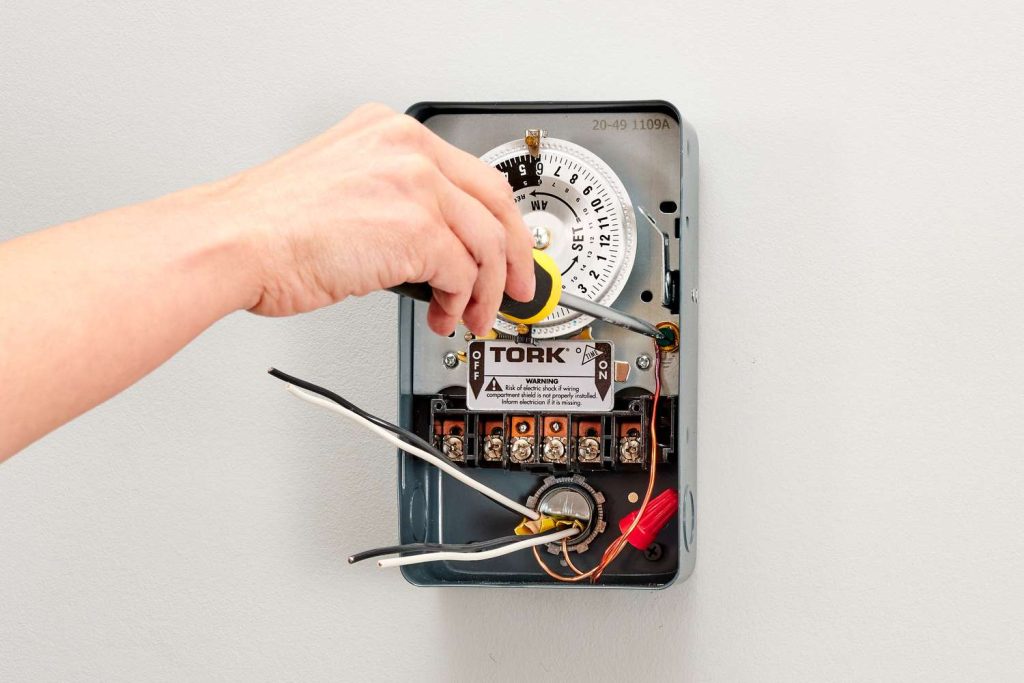
A mechanical timer switch, also referred to as an analog saklar pengatur waktu, adalah perangkat pengatur waktu yang menggunakan komponen fisik seperti pegas, roda gigi, dan motor listrik untuk mengatur pasokan daya ke perangkat listrik.
Untuk mempelajari lebih lanjut tentang perangkat ini, berikut panduan praktis untuk memulai.
Bagaimana Cara Kerja Sakelar Pengatur Waktu Mekanik?
Beroperasi secara analog, ia memanfaatkan mekanisme jam untuk menentukan kapan daya dihidupkan dan dimatikan.
Jenis sakelar pengatur waktu ini dikonfigurasikan secara manual dengan menyesuaikan kenop untuk mengatur interval waktu yang diinginkan untuk menghidupkan atau mematikan daya.
Meskipun sakelar pengatur waktu mekanis hemat biaya dan mudah dikonfigurasikan, sakelar ini mungkin lebih besar dan memerlukan lebih banyak pemeliharaan karena penggunaan komponen yang bergerak.
Umumnya digunakan untuk mengelola pencahayaan, peralatan, dan perangkat listrik lainnya, mereka menawarkan cara ekonomis untuk mengotomatisasi berbagai sistem.
Meskipun munculnya pengatur waktu digital dan elektronik yang lebih rumit, sakelar pengatur waktu mekanis tetap menjadi pilihan yang sederhana dan ramah anggaran untuk mengawasi lampu dan perangkat lainnya.
Jenis-jenis Timer Mekanik
Mechanical timer switches can be categorized by several factors. Understanding these types helps you choose the right model for your specific application.
By Time Cycle
- 24-Hour Mechanical Timer: The dial completes one full rotation every 24 hours. Best suited for daily routines that repeat the same pattern every day, such as turning porch lights on at dusk and off at dawn. Each pin typically represents a 15-minute block, giving you up to 96 ON/OFF segments per day.
- 7-Day Mechanical Timer: The dial completes one rotation every 7 days, allowing different schedules for weekdays and weekends. Ideal for commercial settings where operating hours vary — for example, a shop sign that needs to stay on later on Fridays and Saturdays.
By Installation Method
- Plug-In Timer: Plugs directly into a standard wall outlet. The appliance then plugs into the timer. No wiring required — ideal for residential use with lamps, fans, aquarium equipment, and small pumps.
- DIN Rail Mounted Timer: Installed inside an electrical panel on a standard DIN rail. Requires a hardwired connection by a qualified electrician. Used in commercial and industrial settings for controlling lighting circuits, irrigation systems, HVAC equipment, and motor-driven machinery.
By Number of Channels
- Single-Channel Timer: Controls one electrical circuit. Sufficient for most residential applications.
- Multi-Channel Timer: Controls two or more independent circuits from a single unit, each with its own ON/OFF schedule. Useful in commercial buildings where multiple systems (e.g., interior lights, exterior signs, ventilation) need independent timing.
By Contact Capacity
- Mechanical timers are rated by the maximum current they can safely switch. Residential plug-in models typically handle 10A–16A, suitable for lighting and small appliances. Industrial DIN rail models — like the TOSUNlux THC-15A — support up to 30A, capable of controlling heavier loads such as pumps, motors, and heating elements.
- When selecting a mechanical timer switch, match the timer’s rated amperage to your load. Connecting a device that draws more current than the timer’s rating will cause overheating and potential failure.
Dimana Sakelar Pengatur Waktu Mekanik Digunakan
Sakelar pengatur waktu mekanis adalah perangkat serbaguna yang digunakan untuk berbagai keperluan. Berikut ini adalah rincian penggunaan dan manfaatnya:
- Kontrol Pencahayaan: Ideal untuk mengotomatisasi sistem pencahayaan dalam dan luar ruangan.
- Manajemen Peralatan: Berguna untuk mengelola peralatan seperti oven dan pompa air.
- Kontrol HVAC: Membantu mengatur sistem pemanas dan pendingin secara efisien.
- Hemat Biaya: Menyediakan solusi terjangkau untuk mengotomatisasi sistem rumah dan industri.
- Mudah digunakan: Dikenal karena kesederhanaan dan kemudahan penggunaannya, membuatnya dapat diakses oleh semua orang.
- Tahan lama:Dibuat agar tahan lama, menawarkan keandalan dalam berbagai situasi.
- Penggunaan Industri dan Rumah Tangga: Cocok untuk aplikasi perumahan dan industri.
Meskipun adanya kehadiran saklar pengatur waktu digital, sakelar pengatur waktu mekanis terus menjadi pilihan populer karena harganya yang terjangkau dan pengoperasiannya yang mudah.
Cara Menggunakan Sakelar Pengatur Waktu Mekanik
Untuk menerapkan pengatur waktu atau sakelar analog, Anda memerlukan sistem yang sudah ada, baik dalam skala industri maupun pribadi.
Contoh sistem pribadi meliputi pengaturan motor akuarium, filter, dan lampu.
Sementara model digital memungkinkan penyesuaian tepat hingga ke detik terakhir, jam analog mekanis mudah digunakan, menunjukkan titik awal dan akhir dengan takik pada struktur melingkar.
Penyimpangan + atau – 5 menit dapat terjadi pada sakelar mekanis.
Untuk model digital, rencana mingguan, harian, dan per jam dengan pengaturan menit yang tepat dimungkinkan, memberikan kontrol yang terperinci.
Memilih jenis dan model pengatur waktu yang tepat—digital atau analog—bergantung pada tujuan dan persyaratan khusus tugas yang sedang dikerjakan.
Cara Mengatur Sakelar Pengatur Waktu Mekanik
Untuk mengonfigurasi sakelar pengatur waktu mekanis, ikuti langkah-langkah umum berikut:
- Hubungkan pengatur waktu ke dinding dan peralatan ke pengatur waktu.
- Sesuaikan putaran untuk mengatur waktu saat ini.
- Press down the pins for the times you want the device to activate, and keep them pulled out for when you want the device to deactivate.
- Jika tersedia, atur timer ke mode “On-Auto-Off”.
- Pindahkan tombol sakelar manual ke pengaturan “Timer”.
Langkah-langkah ini mungkin sedikit berbeda berdasarkan model sakelar pengatur waktu mekanis tertentu.
Penting: Selalu konsultasikan petunjuk produsen untuk panduan yang lebih tepat.
Cara Memperbaiki Sakelar Pengatur Waktu Mekanik yang Tidak Berfungsi
Untuk mengatasi masalah dengan sakelar pengatur waktu mekanis yang tidak berfungsi, pertimbangkan langkah-langkah pemecahan masalah umum berikut yang diperoleh dari hasil pencarian:
- Langkah 1: Verifikasi Pengaturan Timer: Pastikan pengatur waktu telah diatur dengan benar, karena pengaturan yang salah dapat menyebabkan kegagalan fungsi yang tidak diharapkan.
- Langkah 2: Periksa Kabel Pengatur WaktuPastikan kabel dan distribusi daya terpasang dengan benar, atasi terminal longgar yang dapat mengganggu aliran listrik.
- Langkah 3: Periksa Komponen yang Rusak atau Tersangkut: Periksa timer untuk mengetahui apakah ada roda gigi atau pegas yang rusak, yang disebabkan oleh faktor-faktor seperti usia, kotoran, atau serpihan. Lumasi roda gigi yang macet, dan ganti yang rusak jika perlu.
- Langkah 4: Verifikasi Catu Daya dan Sekring: Pastikan pasokan daya memadai dan periksa sekring yang putus, karena voltase yang tidak mencukupi atau sekring yang putus dapat memengaruhi pengoperasian pengatur waktu.
- Langkah 5: Penggantian Baterai: Jika pengatur waktu menggunakan baterai, gantilah jika tampilannya tidak jelas atau jika pengatur waktu tidak berfungsi dengan benar.
- Langkah 6: Periksa Tripper dan Keselarasan Gigi: Periksa tripper dan gigi untuk mengetahui kerusakan atau ketidaksejajaran. Bersihkan gigi dan pastikan tripper sejajar dengan benar untuk pengaturan waktu on/off yang akurat.
Selalu konsultasikan petunjuk produsen tertentu untuk langkah pemecahan masalah yang komprehensif, karena prosesnya dapat bervariasi tergantung pada model sakelar pengatur waktu mekanis.
Poin Penting
Timer analog atau mekanis adalah perangkat yang mengatur pengoperasian mesin atau sistem listrik, menyalakan dan mematikannya berdasarkan jadwal yang telah ditentukan sebelumnya.
Sasaran utamanya adalah penghematan energi, menjadikan pengatur waktu sebagai pilihan praktis.
Dengan menghentikan perangkat yang mengonsumsi energi saat tidak diperlukan, Anda tidak hanya menghemat listrik tetapi juga meningkatkan kenyamanan pengguna.
Pendekatan yang disengaja untuk mengendalikan operasi perangkat ini berkontribusi terhadap efisiensi energi dan profesionalisme sistem.
Mechanical Timer Switch vs Digital Timer Switch
Mechanical Timer Switch vs Digital Timer Switch
Both mechanical (analog) and digital timer switches serve the same fundamental purpose — automating when electrical devices turn on and off. However, they differ significantly in how they achieve this. Here is a practical comparison to help you choose the right type.
| Fitur | Sakelar Pengatur Waktu Mekanik | Digital Timer Switch |
| Timing Accuracy | ±5 minutes | ±1 second |
| Programming Method | Push physical pins on a dial | Button-based, LCD screen interface |
| Minimum Time Interval | 15 minutes (per pin) | 1 minute or 1 second |
| Number of Programs | Simple daily schedules, budget installations, and environments without reliable power | 8–20+ independent programs |
| Weekday/Weekend Scheduling | Only on 7-day models | Standard on most models |
| Power Outage Behavior | Schedule shifts by outage duration (no battery) | Battery backup retains schedule (typically 3V lithium) |
| Price Range | $5 – $20 (residential); $15 – $50 (industrial) | $15 – $60 (residential); $30 – $120 (industrial) |
| Jangka hidup | 5–10 years (moving parts wear over time) | 8–15 years (no moving parts) |
| Pemeliharaan | Periodic cleaning and lubrication of gears | Minimal; battery replacement every 3–5 years |
| Kebisingan | Faint ticking/clicking from motor and gears | Silent |
| Ease of Setup | Very easy — push pins, no manual needed | Moderate — requires reading the manual to program |
| Terbaik Untuk | Simple daily schedules, budget installations, environments without reliable power | Complex multi-program schedules, second-level precision, setups with frequent power outages |
When to Choose Mechanical: If your application follows a simple, repeating daily pattern (e.g., lights on at 6 PM, off at 11 PM every day) and you want the lowest upfront cost with zero programming complexity, a mechanical timer is the practical choice.
When to Choose Digital: If you need different schedules for different days of the week, second-level precision, or the schedule must survive power outages without resetting, a digital timer is worth the extra cost.
TOSUNlux offers both types. The THC-15A digital programmable timer supports 24-hour / 7-day scheduling with a contact capacity of up to 30A, making it suitable for both light and heavy-duty applications.
Rekomendasi Produk

TOSUNlux THC-15A Programmable Timer Switch
Based on the requirements discussed throughout this guide, the TOSUNlux THC-15A is a versatile option that bridges the gap between simple mechanical timers and fully programmable digital controllers.
Key Specifications:
| Spesifikasi | Detail |
| Timer Type | Digital programmable |
| Time Cycle | 24-hour and 7-day scheduling |
| Kapasitas Kontak | 16A – 30A |
| Minimum Program Interval | 1 minute |
| Number of ON/OFF Programs | Up to 17 per day |
| Pemasangan | DIN rail (35mm standard) |
| Power Outage Protection | Built-in lithium battery backup |
| Menampilkan | LCD with backlight |
Why It Fits Common Use Cases
- For lighting control: Supports separate weekday and weekend schedules, eliminating the manual adjustment needed with basic mechanical timers.
- For industrial motor control: The 30A contact capacity handles pumps, fans, and motors without requiring an external contactor for loads under 30A.
- For environments with frequent power outages: The battery backup retains your programmed schedule, so you do not need to reset the timer after every blackout.
TOSUNlux also manufactures circuit breakers, contactors, isolating switches, and distribution boards. Visit tosunlux.eu to request a quotation or browse the full product catalog.
Tanya Jawab Umum
Q1: How long does a mechanical timer switch last?
A well-maintained mechanical timer switch typically lasts 5 to 10 years. Lifespan depends on usage frequency, environmental conditions, and regular maintenance of moving parts like gears and springs. Timers used in dusty or humid environments may require more frequent cleaning to reach their full lifespan.
Q2: Can I use a mechanical timer switch outdoors?
Yes, but you need an outdoor-rated model with an appropriate IP rating — typically IP44 or higher — to protect against moisture and dust. Always install outdoor timers inside a weatherproof enclosure, and avoid direct exposure to rain or sprinkler spray.
Q3: What is the difference between a mechanical and a digital timer switch?
Mechanical timer switches use physical gears and springs with ±5-minute accuracy, while digital timers use electronic circuits for precision down to the second. Mechanical timers are more affordable and easier to set up, while digital timers offer more programming flexibility and battery-backed memory that survives power outages.
Q4: Why is my mechanical timer switch not turning off?
Common causes include stuck or misaligned pins (trippers), worn-out gears, or a faulty switch contact. First check that the pins for OFF periods are fully in the raised position. Then inspect the mechanism for debris or gear damage. If the timer motor is running but the switch does not disengage, the internal contact may be welded shut from switching high-current loads — in this case, replace the timer.
Q5: How do I reset a mechanical timer switch?
Pull all pins (trippers) to the OFF (raised) position, then rotate the dial clockwise until the arrow aligns with the correct current time. After that, push down only the pins for your desired ON periods. Finally, set the mode switch to “Auto” or “Timer” to activate the schedule.
Q6: Can a mechanical timer switch save electricity?
Yes. By automatically turning off devices when they are not needed — such as lights, pumps, and heaters — a mechanical timer can reduce energy waste by 10% to 30%, depending on the application and how many hours per day the device was previously running unnecessarily.
Q7: What is the maximum load for a mechanical timer switch?
Most residential plug-in mechanical timers handle 10A to 16A (approximately 1,150W to 1,840W at 115V, or 2,200W to 3,520W at 220V). Industrial DIN rail models like the TOSUNlux THC-15A support up to 30A. Always check the timer’s rated current on its label before connecting any appliance, and never exceed the stated capacity.
Telp: +86-577-88671000
E-mail: ceo@tosun.com
Skype: tosunelektrik
Telepon: +86-139 6881 9286
WhatsApp: +86-139 0587 7291
Alamat: Kamar No.1001 Wenzhou Fortune Center, Station Road, Wenzhou, Tiongkok
PERMINTAAN PENAWARAN
WhatsApp kami